Tag: technology

  • Unlocking Retail Success: The Science of Visual Merchandising

    Visual merchandising in retail goes beyond creating attractive stores—it’s a science supported by compelling data. Research shows that 8 out of 10 shoppers make their buying decisions based on what catches their eye in-store. This makes strategic product presentation a vital component of retail success.

    The numbers paint an impressive picture of merchandising analytics. Products placed at eye level see 82% higher purchase rates. Shoppers linger 20% longer in stores with well-laid-out displays. A store’s window displays can increase foot traffic by 23%. The impact reaches further than immediate sales—73% of customers report they’re more likely to return to stores with appealing visual merchandising.

    This piece takes a closer look at the hidden science behind successful retail displays. You’ll learn how leading brands exploit merchandising analysis to boost sales. We’ll also share data-backed strategies you can apply to your store. Let’s get into what research reveals about this essential element of retail success.

    How Retailers Collect and Use Data for Visual Merchandising
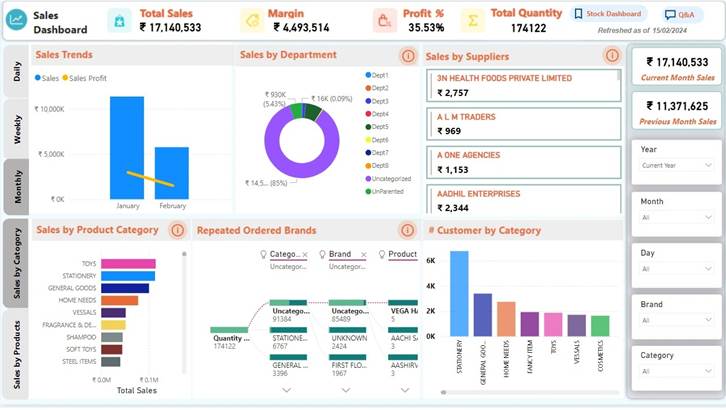
    Image Source: SignaTech

    “Visual merchandising is the art of implementing effective design ideas to increase store traffic and sales volume.” — Linda Cahan, Visual Merchandising Expert and Retail Consultant

    Data-driven decisions shape successful retail displays. Modern retailers use sophisticated methods to collect valuable information that guides their visual merchandising strategies.Heat mapping technology is pioneering modern retail analytics with color-coded visualizations that show how customers move through stores. These tools show popular areas and how long customers stay in each spot. Research shows that customers who spend 10% more time in a store are 20% more likely to make purchases. Major brands like Samsonite and Sephora use heat maps to create better store layouts and place promotional items where customers gather most.

    Point-of-sale (POS) data gives retailers a wealth of useful information. Every sale provides details about inventory, sales, products, customers, and staff performance. Retailers learn which products sell best and the best times to sell them. Elite Eleven saw amazing results after they started using complete POS analytics – their revenue grew by 82% and sales jumped 240%.

    Smart customer segmentation makes merchandising more effective. Retailers group customers based on their demographics, behaviors, priorities, and loyalty patterns. This grouping recognizes that customers are at different points in their buying process and helps create targeted marketing. Customer reviews matter too – 58% of shoppers would pay extra to support well-reviewed companies.

    Social media statistics help shape merchandising decisions. Boston Retail Partners reports that 27% of retailers use social data to plan products and promotions. This strategy works well – 44% of shoppers say digital displays linked to social media affect what they buy.

    Transaction records reveal detailed consumer behavior patterns. Retailers analyze spending data from more than 100 million credit and debit cards, sorted by income, age, region, and city location. Companies use this up-to-the-minute data analysis to measure their performance against competitors and spot market share changes across different customer groups.

    Turning Data into Actionable Merchandising Strategies

    Smart retailers know that collecting retail data is just the beginning. They need to turn these numbers into visual merchandising strategies that work. Analytics help stores make evidence-based display decisions that substantially affect customer behavior and sales.

    Store location analytics offer valuable lessons to optimize product placement. Retailers can spot high-visibility areas by tracking customer movement and local buying patterns. A global consumer packaged goods company showed this method’s value. They used location data to improve shelf positions in struggling regions and boosted sales by 15% in three months.

    Heat mapping technology plays a vital role in strategic merchandising. Target stands as a prime example. The retail giant uses heat maps to find underperforming areas and creates more attractive displays. This evidence-based reorganization brought more foot traffic and better sales overall.

    Predictive analytics helps stores move from reactive to anticipatory merchandising. Stores can optimize their inventory and visual displays before demand peaks by analyzing seasonal trends and shopping patterns. This forward-thinking approach keeps popular items in stock while cutting excess inventory costs.

    A/B testing proves what appeals to shoppers with hard evidence. Stores can base their decisions on actual customer responses instead of guesses by running controlled tests with different layouts, product spots, and promotional displays. Many successful retailers test various merchandising elements regularly to find what drives the most customer participation.

    Up-to-the-minute performance tracking makes merchandising optimization complete. A global snack brand studies in-store heatmap data to see how customers interact with promotional displays. They keep refining shelf layouts and product visibility. This ongoing strategy increased sales by 10% per store in key regions.

    These evidence-based approaches prove visual merchandising’s value in retail. They turn complex analytics into real business results.

    Measuring the Impact: What the Data Really Shows

    “Visual merchandising is the practice of optimizing the presentation of products and highlighting their features in a retail setting.” — Bish Creative, Retail Design and Visual Merchandising Agency

    Numbers tell a compelling story about visual merchandising’s role in retail profits. Retailers track specific metrics to show the return on their merchandising investments.

    The conversion rate shows how well merchandising works. Brick-and-mortar stores can easily calculate this by dividing total sales by foot traffic and multiplying by 100. A healthy  of 25% shows that one in four visitors buys something. This reflects how displays shape buying decisions.conversion rate

    Sales numbers provide clear proof of good merchandising. Smart product displays can boost sales by 30%. Displays that create brand experiences can increase sales by up to 540%. Products at eye level are 82% more likely to sell. This prime spot accounts for 52% of all retail sales.

    Time spent in stores relates directly to money spent. Each 1% increase in browsing time leads to a 1.3% rise in sales. Stores that change their displays every two weeks see 23% more visitors and 19% more return visits compared to stores with unchanged displays.

    Sales per square foot helps physical retailers measure success. They divide total store sales by selling area to check space efficiency. Apple leads with about $5,500 per square foot, while department stores average $300-400.

    Inventory turnover shows how fast products sell. You calculate this by dividing Cost of Goods Sold by Average Inventory. Higher numbers mean better merchandising. Costco excels here with 11.2 turnovers yearly.

    Affinity analysis finds products that customers buy together. This helps stores place complementary items near each other. This analytical approach makes shopping baskets bigger and increases sales by 20%.

    These metrics prove what successful retailers already know. Visual merchandising isn’t just about looks – it’s a proven science that affects retail performance.

    Conclusion

    Numbers tell a powerful story about visual merchandising’s impact on retail businesses. This piece shows how data turns store displays from decorations into effective sales tools. Product placement at eye level substantially increases purchase probability by 82%. Heat mapping, POS systems, and transaction analysis give retailers practical insights about customer behavior.

    Evidence-based visual merchandising produces clear results. Stores that update their displays every two weeks see 23% higher foot traffic and 19% more repeat visits. Well-executed displays can boost sales by up to 540% when they create meaningful brand experiences. These figures show without doubt why top retailers put money into merchandising analytics.

    The science of visual merchandising stands as retail’s most effective profit driver, despite being overlooked. Retailers can create displays that attract customers and guide purchases by using location analytics, heat mapping, and predictive modeling. Time spent in store directly affects sales – a 1% increase in dwell time leads to 1.3% more revenue.

    Visual merchandising exceeds pure esthetics. Modern retail displays depend on solid data and measurable results instead of subjective design choices. Retailers who accept new ideas and use evidence-based approaches succeed in today’s competitive market. Smart businesses should focus on implementing these proven strategies quickly in their retail spaces.

  • Boost Customer Retention with Journey Visualization

    Customer journey visualization can boost retention by up to 15% in six months. This fact surprises many business owners.

    Companies that map and understand their customers’ paths learn valuable lessons that lead to measurable outcomes. Our experience shows how visualizing customer trips helps spot major issues and uncovers new ways to enhance user experience. Visual customer journey maps can speed up your sales process and increase your conversion rates.

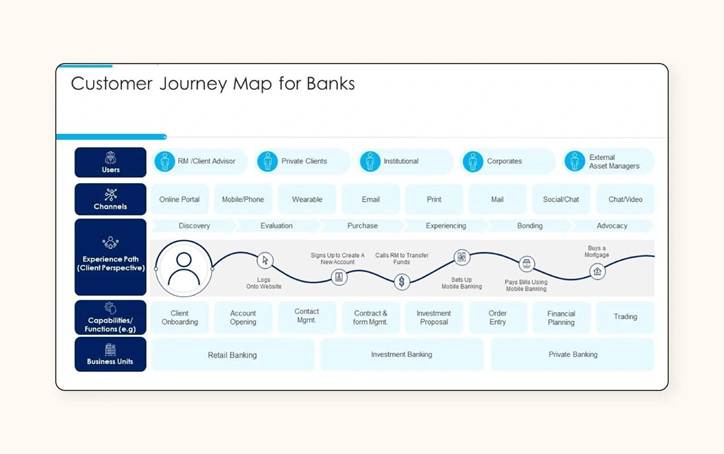
    A well-designed customer trip map becomes a powerful tool that combines product analytics, primary research, and customer interactions. This complete view shows all touchpoints and lets you monitor how potential customers move through each stage of your sales funnel.

    Let’s look at a simple example: if 1,000 people visit your website but only 300 download your product catalog, you can quickly see where to focus your improvements.

    This piece offers step-by-step instructions to create journey maps that deliver business results. We provide practical advice to help you reduce churn, find upselling opportunities, and improve your product strategy.

    Understand the Purpose of Customer Journey Visualization

    Customer trip visualization shows how customers interact with your brand at every point of contact. This visual mapping does more than create simple flowcharts. It paints a detailed picture of the entire customer experience – from the first time they hear about you through their ongoing relationship after purchase.

    Why mapping the customer trip matters

    Visualizing customer trips creates discussions and builds a shared mental model throughout your organization. This shared understanding is vital because  often splits up within companies. No single department sees the complete experience from the customer’s view. Trip maps connect these departmental silos with a visual tool that shows customer needs to everyone.customer experience

    Customer trip mapping helps you:

    • Identify pain points and opportunities in the customer experience that all stakeholders can see right away
    • Predict customer behavior and know what they’ll need before they ask
    • Make use of information to guide product development and marketing plans
    • Arrange your whole business around what customers actually experience rather than what you think they want

    The business value stands out—80% of today’s companies compete mainly on customer experience. Brands that give excellent customer experiences can boost revenue by 2-7%. These numbers show the direct link between trip visualization and business results.

    Trip mapping changes the focus from company thinking to accessible design. You see exactly what customers experience at each step instead of building experiences on assumptions. This approach shows gaps and inconsistencies you might miss otherwise.

    How it improves user experience and retention

    Trip visualization makes both user experience and retention better by finding moments of frustration and delight in all customer interactions. This detailed view lets you:

    You can spot specific friction points that slow down or stop conversions. This helps you fix problems before customers give up. To cite an instance, seeing the customer path might show that people get confused during checkout or can’t find help easily—problems you can fix once you know about them.

    The experience stays consistent across all contact points. Customer trips often use many channels, from social media to website visits to email messages. This mapping gives you one clear view of how customers use these channels. Your message and experience stay the same everywhere.

    Retention results really matter. Research shows that keeping just 5% more  can increase profits up to 95%. This proves why trip visualization helps sustainable growth. The numbers also show that 94% of customers buy again after a good experience. When you map and improve each stage of the trip, you create more of these positive moments that build lasting loyalty.customer retention rates

    Trip visualization also creates chances for personal touches throughout the customer’s time with you. You can make your messages and offers more relevant by understanding what drives customers at different points. This targeted approach builds trust and creates stronger emotional bonds with your brand.

    Trip mapping helps you keep getting better. Customer expectations change over time, so your visualizations should change too. This ongoing improvement keeps your customer experience fresh and competitive, leading to satisfied and loyal customers.

    Trip visualization turns complex customer information into clear action steps. Instead of getting lost in scattered numbers, you get a clear picture of how each interaction adds to the overall experience—and exactly where improvements will help both satisfaction and profits the most.

    Define Clear Goals and Scope

    You need to set proper boundaries and direction before you start creating your visual customer journey map. Your journey mapping success depends on clear parameters that give your work purpose and focus.

    Set measurable objectives

    The foundation of effective journey visualization starts with concrete, measurable goals that line up with your broader business objectives. Your mapping project should follow SMART goals—Specific, Measurable, Attainable, Relevant, and Time-bound. This well-laid-out approach will give your journey mapping efforts clear direction and accountability.

    A vague goal like “improve customer experience” won’t cut it. Here are better specific objectives:

    • Boosting retention by 15% in six months
    • Halving new user time-to-value by Q4
    • Increasing satisfaction at critical touchpoints by 20% annually

    These specific objectives help you track progress and determine if your journey mapping initiative succeeded. On top of that, Key Performance Indicators (KPIs) serve as progress milestones to help you make evidence-based decisions throughout the visualization process.

    Note that each mapping project should target one specific goal. Maps that try to tackle multiple objectives at once often become too generic or complex and lose their effectiveness. Your goals will show which parts of the customer experience need the most attention and resources.

    Choose the right customer segment

    Journey mapping works best when you create it for a specific customer type instead of trying to fit everyone into one map. Unless you run an early-stage company with a single product and customer persona, focus on one customer segment per map.

    Let’s identify your ideal customers:

    • Who are your existing customers?
    • Who makes up your target audience on social media?
    • What types of customers do you have in your email lists?
    • What problems do these consumers want to solve?

    Build detailed customer personas using real data and interviews rather than assumptions. Each persona should show key goals, needs, pain points, and tasks that shape customer behavior. Companies with different audiences might need separate journey maps for each demographic segment.

    Start by building maps for your most common customer types or those who buy your most valuable products. This focused approach ensures your visualization offers meaningful insights instead of generic observations that don’t drive action.

    Decide on the journey stage to map

    Your journey map’s scope plays a big role in how useful it becomes. You’ll need to choose between mapping an end-to-end customer journey or focusing on a specific sub-journey.

    Organizations just starting their customer experience initiatives often benefit from end-to-end journey mapping. This detailed approach shows customer movement through awareness, consideration, purchasing, and post-purchase activities. It gives you a complete view to spot areas that need the most attention across the entire customer lifecycle.

    A specific sub-journey lets your team head over to particular aspects of the customer experience in detail. End-to-end journeys might cover years, but sub-journeys usually happen over days or weeks. This shorter timeframe lets you capture more detailed information about customer experiences as they happen.

    Your first map should start with a known issue, specific persona, or problematic area of your website. Keep the scope manageable by focusing on something you can break into four or five clear steps. This approach makes the mapping process easier while still giving valuable insights.

    The right journey scope depends on your specific objectives. This choice involves trade-offs—too broad a journey might not show enough detail for corrective actions, while too narrow a focus could miss important opportunities nearby.

    Build Customer Personas and Backstories

    Personas are vital to visualizing your customer’s trip. They act as main characters in your mapping story. These detailed representations turn abstract data into relatable human profiles that guide your mapping process.

    Use data to create realistic personas

    You need more than guesswork and demographics to create powerful personas. In fact, personas based on actual customer behavior provide much more value than made-up characters built on assumptions.

    Here’s how to gather information from multiple sources:

    • Customer interviews and surveys – Get first-person insights about goals, frustrations, and priorities directly from users
    • Website and product analytics – Study behavioral patterns, including popular features, common drop-off points, and usage metrics
    • Social media insights – Get into how customers talk about your products and interact with your brand publicly
    • Support tickets and reviews – Look through customer feedback to find common themes and pain points
    • CRM data – Make use of existing customer information about purchase history and priorities

    Combining these different data sources creates a complete picture of each customer group. This method ensures your personas show real behaviors instead of internal assumptions about your audience.

    Facebook shows how well this works. The company analyzed user data to create specific personas after receiving anonymous complaints. Their research showed teenagers felt embarrassed about tagged photos, with girls mentioning this problem more often than boys. These findings helped Facebook improve its coverage and support systems based on real user needs.

    Each persona should include:

    • A name and realistic photo to promote connection
    • Demographic information (age, location, education, income)
    • Personal attributes (goals, needs, interests)
    • Behavioral patterns and priorities
    • Technological proficiency and device usage
    • Quote or story that captures their viewpoint

    Your personas should evolve with time. Markets change constantly, making unchanging personas quickly obsolete. You need systems to update your personas with new data, keeping them accurate representations of current customers.

    Understand user motivations and pain points

    Demographics provide simple context, but understanding motivations and pain points adds depth and usefulness to your personas. These elements help predict customer behavior throughout their trip.

    Look beyond basic goals like “finding a product” when mapping motivations. Find the core needs—customers might want efficiency, status, security, or something completely different. To cite an instance, a car-shopping persona might care about safety, environmental values, or social image, leading to different behaviors.

    You can spot pain points through:

    • Exit surveys that show why people leave
    • Session recordings that reveal moments of frustration
    • Customer support conversations highlighting common problems
    • Open-ended questions that bring detailed feedback

    Document the emotions your personas might feel at each touchpoint in your journey map. A well-crafted persona helps you understand both customer actions and feelings during brand interactions. This emotional mapping shows critical points where satisfaction drops and people might leave.

    Note that emotions drive decisions. Understanding a customer’s emotional state at each journey stage helps create experiences that address concerns at the right moment. Research shows that tracking emotions throughout the customer trip helps businesses identify when customers feel frustrated, excited, or confused.

    Data-backed personas turn your journey maps from simple flowcharts into detailed stories about real customer experiences. The real value comes when these personas guide your decisions—shaping product development, marketing messages, and support processes based on genuine customer understanding.

    Map Out Touchpoints, Emotions, and Actions

  • Mastering Data Visualization: Best Practices for Impactful Insights

    Our brains process  60,000 times faster than text. This fascinating fact explains why data visualization best practices matter so much for people who work with complex information today.visual information

    Clear data visualization turns confusing numbers into insights that everyone understands easily. Not all visualizations deliver the same impact. The right approach reveals important trends and patterns, but poor design choices can cause misinterpretation or missed opportunities. Visual reports substantially improve communication between teams, especially when technical and non-technical members might struggle with raw data.

    This piece explores ways to visualize data that truly connect with your audience. You’ll learn everything from picking the right chart type to using color strategies that emphasize key points. These visualization tips can reshape your presentations and reports completely. We aim to help you build a strategy that makes information available and tells compelling stories to drive informed decisions.

    Ready to turn your complex data into powerful visual narratives? Let’s delve in!

    Understand the Purpose and Audience

    “The purpose of visualization is insight, not pictures.” — Ben Shneiderman, Distinguished University Professor, Department of Computer Science, University of Maryland; Human-computer interaction pioneer

    My data visualization process starts with two crucial elements: purpose and audience. These elements shape how I create effective [data visualization](https://www.datacentricityhub.com/post/a-middle-manager-s-ai-survival-kit-tools-tips-and-tactics).A clear purpose powers the most impactful visualizations. Good data visualization answers specific questions and drives action, not just displays information. Visualization experts suggest that clear goals help determine “the type of data you use, analysis you do, and visuals you use to communicate your findings effectively”. A well-defined data extraction process “eliminates the unessential and gets the message across as quickly and clearly as possible”.

    The audience plays an equally vital role in visualization design. Each type of viewer needs a unique approach:

    • Executives and senior stakeholders want strategic overviews of key business metrics through simple visualizations that reveal trends quickly.
    • Technical experts such as data scientists and analysts can handle complex visualizations with advanced statistical methods and detailed notes.
    • Non-technical audiences prefer simple charts without jargon, presented in appealing, easy-to-use formats.
    • Mid-level managers need visualizations that connect strategic goals to operational realities, focusing on department metrics.

    The visualization must match the audience’s needs based on:

    1. Their data literacy and expertise level
    2. Their existing subject knowledge
    3. The decisions they’ll make using the data
    4. The time they have to interact with the visualization

    The choice of medium matters too. Print materials work only with static visualizations, while digital formats enable dynamic or interactive options.

    The process should follow this principle: “an effective visualization of data should be relevant to its intended audience and convey meaning”. Great visualization turns data into applicable information that leads to better, faster decisions.

    Choose the Right Visualization Type

    Image Source: Prezentium

    Your data’s story determines the best visualization type. The right chart makes your message clear and helps achieve your communication goals.

    Bar and column charts shine at comparing categories. Horizontal bar charts work great with longer labels or more than 10 data points. Vertical column charts fit better with fewer categories and shorter labels. Research shows that people grasp value differences more accurately with bar charts than other types.

    Line charts naturally show changes over time. They connect data points to reveal trends and patterns quickly. Time series graphs highlight trends while line graphs show continuous numeric values. Polar area diagrams work best for cyclical time data like seasonal patterns.

    Scatter plots help us understand relationships between variables. Each dot sits at the intersection of two values to show correlations and patterns in your dataset. Dense data can make scatter plots hard to read, so heatmaps might work better.

    Color gradients in heatmaps show density or intensity clearly. These charts excel at revealing concentration patterns and high/low density areas. They also give qualitative analysis of spatial distributions.

    Pie charts show parts of a whole but work best with 3-6 data series that have clear numerical differences. Donut charts offer a cleaner look for smaller datasets with 2-4 categories.

    My decision process starts with a simple question: “What would I like to show?”. This guides me to four main purposes:

    • Comparison: Bar/column charts
    • Distribution: Histograms, heatmaps
    • Composition: Pie/donut charts, treemaps
    • Relationship: Scatter plots, bubble charts

    Matching visualization type to purpose creates data stories that communicate clearly and effectively.

    Apply Best Practices for Effective Data Visualization

    “You can achieve simplicity in the design of effective charts, graphs and tables by remembering three fundamental principles: restrain, reduce, emphasize.” — Garr Reynolds, Internationally acclaimed communications expert, author of ‘Presentation Zen’

    Becoming skilled at core design principles helps transform good charts into great ones when creating truly effective visualizations. The right chart type needs refinement to achieve maximum clarity and effect.

    My focus stays on simplicity to keep visualizations clean and easy to digest. Business opportunities might slip away when complex visualizations create confusion and information overload. So, I remove unnecessary elements and keep only what tells the data story.

    Colors need careful thought in their application. Strategic use of color highlights important information rather than just decoration. The right balance prevents using too many colors that create visual chaos or too few that make data blend together. The color choices must work for everyone, including the 4% of people with color blindness. Red, orange, purple, or darker muted colors work best for negative results.

    Simple charts become powerful communication tools with text and annotations. The eye naturally moves to the top or upper left corner first, which makes it perfect for the most important view. Key insights stand out through strategic annotations that provide essential context and make everything more readable. Limiting views to three or four prevents the big picture from getting lost in details.

    Data integrity stands above everything else. My visualizations maintain honesty by:

    • Starting bar chart y-axes at zero to avoid visual exaggeration
    • Using the same scales for related graphs meant for comparison
    • Avoiding 3D charts for data representing 1-2 variables

    The design must work for everyone. High contrast between foreground and background elements makes visualizations clear. Red-green combinations should be avoided, and patterns help separate data points when needed.

    These data visualization best practices help me create visualizations that communicate even the most complex information effectively.

    Conclusion

    Raw numbers become compelling visual narratives through thoughtful data visualization. Visual stories work as powerful communication tools when creators understand their purpose and audience clearly. A solid foundation will give our stories the power to appeal to viewers and lead to informed decisions.

    The right chart selection plays a vital role in communicating effectively. Bar charts work best for comparisons. Line charts show trends over time. Scatter plots demonstrate relationships between variables. Simple design principles like strategic colors and thoughtful annotations can lift basic charts into powerful tools that encourage participation instead of confusion.

    Notwithstanding that, beautiful visualizations mean nothing without data integrity. Every decision must reflect honest representation, from choosing axes to selecting colors. Data visualization’s success depends on balancing visual appeal with accuracy, accessibility, and audience awareness.

    Powerful visualizations do more than just show data—they uncover insights that might stay hidden otherwise. These techniques are not just technical skills. They shape how we think about turning complex information into clear, useful knowledge. Well-executed data visualization goes beyond informing decisions—it helps clarify future paths that numbers alone could never show.

  • Avoiding Common Mistakes in Trend Analysis

    Quality data makes all the difference in trend analysis results. Statistical techniques help identify historical patterns and project future outcomes. The success of trend analysis depends on proper execution.

    Many organizations find it challenging to spot meaningful trends in their data. Bad data quality often points to wrong conclusions. Simple interpretations of complex patterns create projections that miss the mark. Market analysts often assume trends follow straight lines, but reality proves otherwise. Our research shows trend analysis works best with objective interpretation and careful attention to outside factors.

    Let me get into why most approaches to trend analysis don’t deliver and share proven methods that get results. Learning proper trend analysis helps you discover opportunities before your competition. This knowledge enables confident strategic decisions based on evidence rather than guesswork.

    Why Most Trend Analysis Fails in Practice

    “Any statistics can be extrapolated to the point where they show disaster.” — Thomas Sowell, American economist and social theorist, Senior Fellow at the Hoover Institution

    Traditional trend analysis approaches rarely deliver reliable results. The effectiveness of these techniques depends on key factors that many practitioners overlook.

    Data quality determines the accuracy of trend analysis completely. Working with incomplete, inaccurate, or flawed information makes even sophisticated analytical methods produce misleading or wrong results. Past patterns don’t necessarily determine the future, which creates a fundamental limitation since trend analysis heavily relies on historical data.

    Analysts often fail to consider external influences, which creates a major weakness. Regulatory changes, technological advancements, economic changes, and global geopolitical events can suddenly alter long-standing trends. To cite an instance, a telecom business might see higher demand from 5G network advancements, but face unexpected challenges from global supply chain disruptions.

    On top of that, many professionals simplify things too much. They assume trends follow linear patterns when reality rarely works that way. This basic misunderstanding guides projections that become more inaccurate as time passes.

    The way people interpret data creates another challenge. Analysts’ own biases or expectations influence how they view data, and they might draw conclusions based on personal beliefs rather than objective reality. This human element adds variability to what should be an analytical process.

    Most analysts look at trends in isolation instead of understanding how they connect. Netflix’s dominance in home entertainment didn’t happen just because people disliked visiting video stores. The meeting of brick-and-mortar retail decline, on-demand content growth, and broadband acceleration created this market change.

    Market noise – irrelevant or misleading information – creates confusion and misinterpretation of genuine market trends. Traders often mistake short-term fluctuations for meaningful patterns. These premature or misguided decisions magnify market volatility instead of capitalizing on real opportunities.

    Core Data-Backed Methods That Actually Work

    Image Source: Slidenest

    Data-backed techniques deliver reliable results when you use them correctly. Among all statistical methods, regression analysis stands out as the quickest way to identify trends and make forecasts.

    Regression analysis helps us learn about relationships between dependent and independent variables. This tells us which factors affect outcomes by a lot [1]. The versatile method lets businesses calculate complex relationships and shows which variables drive results and which ones don’t matter. To name just one example, regression shows how marketing spend affects revenue or how price changes impact sales volume [1].

    Time series decomposition is another powerful way to break data into distinct parts:

    • Trend component: The long-term progression
    • Seasonal component: Regularly repeating patterns
    • Residual component: Remaining irregularities

    This breakdown helps analysts spot patterns while filtering out noise. These models can be either additive (components add together) or multiplicative (components multiply), based on whether seasonal patterns stay constant or change over time [2].

    Moving averages help smooth out volatile data effectively. Simple moving averages treat all data points the same, while weighted moving averages focus more on recent data [3]. On top of that, median filters work better than mean-based approaches when handling outliers [4].

    You have several proven ways to detect anomalies. The Exponentially Weighted Moving Average (EWMA) compares recent weighted averages with baseline expectations [5]. STL decomposition splits time series into seasonal, trend, and residual components to find unusual data points [6].

    Clustering methods improve trend analysis by grouping similar data points together. K-means clustering organizes data into predefined clusters by measuring how close points are to cluster centers [7]. This helps analysts find natural groupings in complex datasets and reveals patterns hidden in raw data.

    These methods work best when you apply them with quality data and understand their context properly. They are the foundations for accurate trend identification and forecasting.

    How to Analyze Trends with a Reliable Framework

    “If the number of experiments be very large, we may have precise information as to the value of the mean, but if our sample be small, we have two sources of uncertainty:— (I) owing to the ‘error of random sampling’ the mean of our series of experiments deviates more or less widely from the mean of the population, and (2) the sample is not sufficiently large to determine what is the law of distribution of individuals.” — Karl Pearson, English mathematician and biostatistician, founder of mathematical statistics

    A reliable trend analysis framework needs a step-by-step approach with precise methods. The first step is to set clear goals. You need to know exactly what you want to measure – whether that’s how consumers behave, how markets perform, or what financial indicators show [[8]](https://www.quantilope.com/resources/what-is-trend-analysis-in-research-process-types-example). These goals will guide all your later decisions.Your analysis timeframe comes next. Your goals help you decide whether to look at long-term trends spanning 10-30 years, medium trends over 3-5 years, or short-term patterns within a year [9]. This choice will shape the patterns you’ll find and their business applications.

    Quality data from multiple sources creates the foundation of good trend analysis. Pick your analytical tools based on what you need and how complex your data is. Simple spreadsheets might work for basic analysis. More complex datasets need specialized statistical software or tools like Tableau or Power BI [10].

    The right analytical techniques should match your goals. You can use moving averages to smooth out changes, regression analysis to find relationships, or break down time series data with decomposition methods [11]. Test different approaches against each other to make sure your findings are solid [12].

    Data visualization helps spot patterns and share what you learn. Users can explore specific details and relationships between variables through interactive dashboards [13]. Keep your visuals clean and simple. They should highlight important trends without overwhelming anyone looking at them [14].

    Many people skip the vital step of checking their work. Compare your results with external standards or independent data to ensure they’re reliable [15]. This protects against any biases that might affect your analysis.

    The last step is to share what you found through clear visuals and useful insights [10]. Keep detailed records of your data sources, methods, and assumptions so others can understand and repeat your work [12].

    Conclusion

    Trend analysis needs more than just finding patterns or collecting data. Traditional approaches often fail because of poor data quality, oversimplification, and subjective interpretation. These mistakes can cause businesses to make strategic errors that get pricey.

    Data-backed techniques like regression analysis, time series decomposition, and advanced clustering provide much more reliable options. These methods work better when applied properly. They give a better explanation by considering data complexity and external factors that shape trends.

    Our framework creates a roadmap to improve analytical skills. It starts with clear objectives, picks the right timeframes, and uses thorough validation. This well-laid-out approach helps avoid common mistakes in conventional trend analysis.

    Quality data is crucial to identify trends correctly. Even the most advanced analytical techniques will give wrong results without it. The data collection and validation process needs equal attention as the analysis.

    Trend analysis should consider how different factors connect instead of looking at trends alone. The business world rarely follows simple, linear patterns. Companies that become skilled at these data-backed methods gain a big competitive edge. They can spot new opportunities early and base decisions on evidence rather than assumptions.